Run A Farm Leaderboard: What It Ranks, Where to Find It, and How to Climb
The Run A Farm leaderboard lists the players in your server with their cash totals in a panel at the top right of the screen. Here is what it shows, where to look, and which activities grow the cash total it displays.
Quick answer
The Run A Farm leaderboard is the panel at the top right of the screen, and it lists the players in your server with their cash totals next to their names. You can see it in the panel at the top right of the screen, and the activities that grow the cash total it displays are: selling eggs, harvesting and selling crops, trucking goods to town, digging ore, and putting workers and vehicles to work so the farm earns more.
- Where to look: the leaderboard panel at the top right of the screen
- What it shows: every player in your server with their cash total
- How to climb: the board displays every player's cash total — eggs, crops, truck sales, ore, workers and vehicles are the documented activities that grow the number it shows.
Climbing the leaderboard is a stated part of Run A Farm, not a community invention: the official experience description invites you to "Climb the leaderboards and build your dream farm with friends!" The board you can actually check mid-session is the panel in the top right of the screen, which lists the players currently in your server alongside their cash totals. Seeing your name sit higher on that list with a bigger number than the farmers around you is what climbing looks like in practice.
How to read the leaderboard panel
The panel keeps things simple: a list of player names, each with a dollar figure next to it. In one recorded session it showed Robloxuser_N1233 at $17,735, Robloxutud977 at $1,420 and anclry022222 at $1,181; at another point, a player named OTTER led the board with $3.5M. The panel itself, with those first three entries at the top right of the screen:
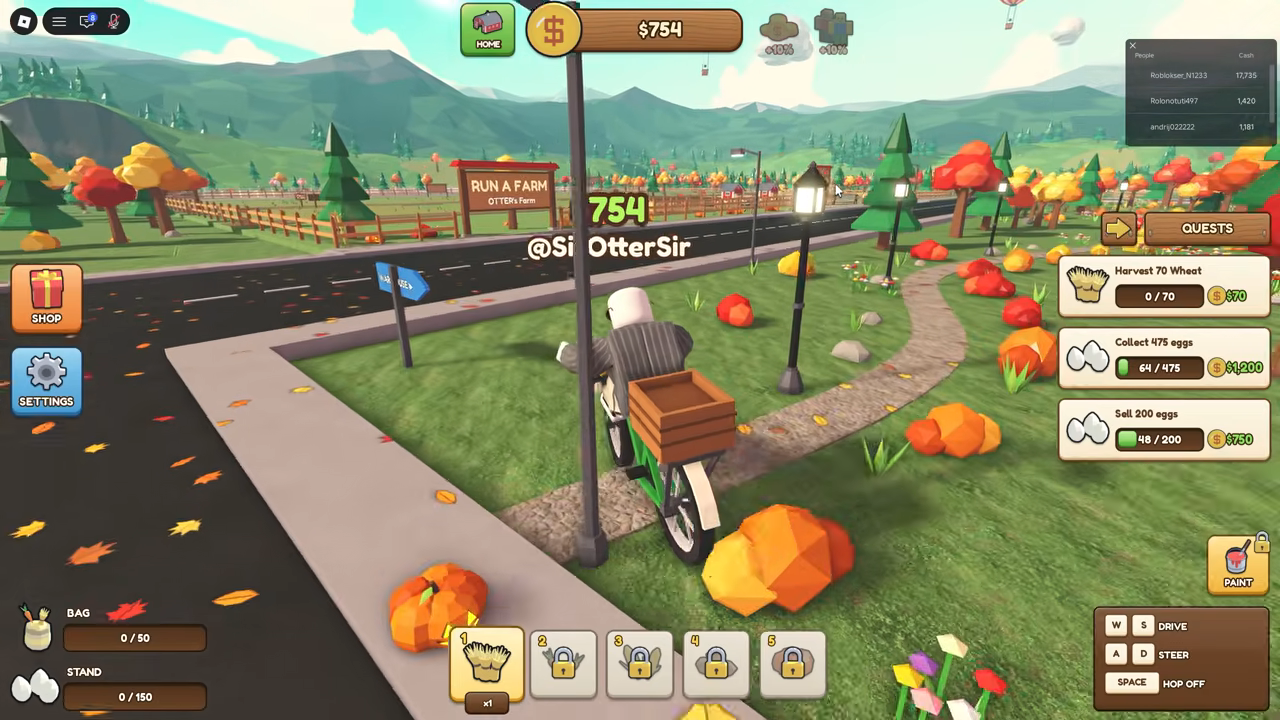
Treat those totals as snapshots of the format rather than benchmarks — the displayed amounts and their order reflect the sessions they were captured in, and they will differ from server to server and over time.
The practical takeaway is that cash is the number the board displays. Every earning decision you make on the farm — what you plant, what you sell, what you reinvest in — changes that displayed total, and the panel gives you a live read on how your cash stacks up against the players actually in your server right now.
What to work on to climb
The official description lays out the core ways cash comes in, and each one feeds the same total the leaderboard displays:
- Collect and sell eggs. Gather eggs and sell them at your stand — the repeatable loop the whole farm grows from.
- Plant, harvest and haul crops. Plant crops, harvest them with tractors, then drive your trucks to town to sell the goods.
- Dig for ore in your own mine. Mining gives you ore to dig alongside the farm's eggs and crops.
- Hire workers. Workers run the farm for you, so parts of the earning loop keep going without you doing every step by hand.
- Buy new vehicles. Tractors harvest and trucks haul to town, so each new vehicle strengthens the loop that turns farm work into sales.
Put together, the intended arc is turning one chicken coop into a full operation: eggs first, then crops and trucking, then ore, with workers and vehicles keeping everything moving while you expand. On the leaderboard, that arc shows up exactly as it should — a cash total that rises each time you sell.
Cash from working codes lands in the same total the board displays, so it is worth claiming whatever is currently active — the maintained list lives on our Run A Farm codes page.
If you are just starting out, the Run A Farm beginner guide walks through the basics, and once the loop feels comfortable, the guide on how to get rich fast covers the money-making side in more depth. Then it is back to the panel in the top right: find your name and watch the cash total that each sale grows.